How to keep characters consistent in AI comics
The most common complaint about AI comics is that the hero looks like a different person in every panel. Here is why that happens, and what actually keeps a character the same.
Why characters drift
Most image generators make every picture from scratch. When you ask for "Maya, a red-haired detective" twelve times, you get twelve readings of that sentence: the hair turns auburn, the jacket changes cut, the scar moves to the other cheek. A comic shows the same person dozens of times, so even small differences stand out. Readers notice faster than you expect, and once they do, they stop believing the story.
Drift usually shows up in a few predictable places:
- Face and build: age, nose, jawline and body type wander.
- Hair: length, colour and style change, especially between close-ups and wide shots.
- Outfit: buttons, collars, colours and accessories appear and vanish.
- Small details: glasses, a watch, a lanyard, a tattoo. These are the first to go and the hardest to notice while you're working.
What helps, with any tool
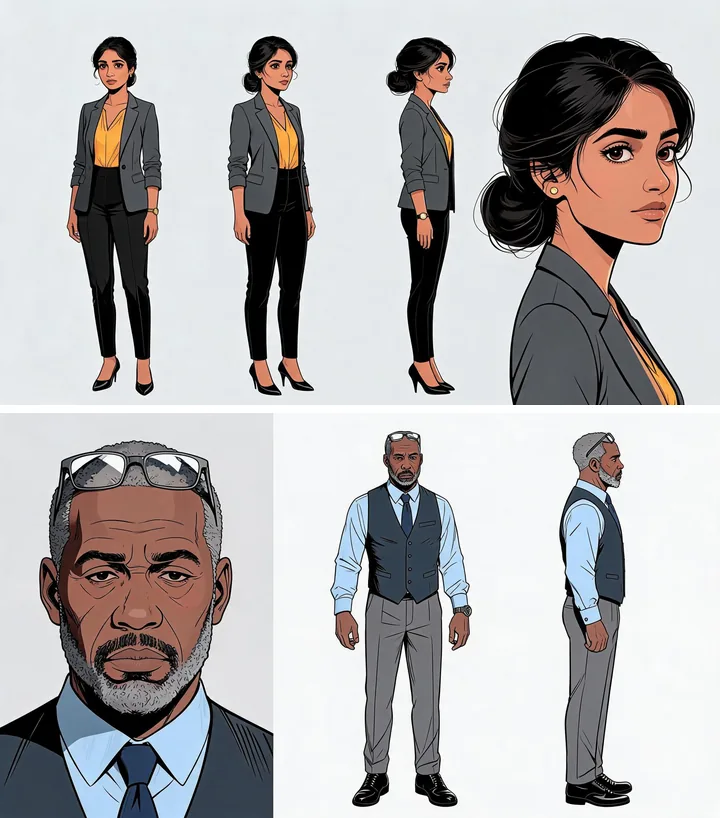
- Design the character once, before any panels. Make a reference sheet with the full figure from the front, side and back, plus a close-up of the face. Every later image should be made from that sheet, not from a text description alone.
- Write details down precisely. "Glasses" is vague. "Thin silver reading glasses, pushed up on his head" is something you can check. Keep a list of these for each character.
- Decide which side things are on. Which wrist has the watch? Which shoulder has the bag strap? Mirror-image mistakes are easy to miss.
- Keep one outfit per scene. If a character changes clothes, treat it as a new version and make a sheet for it.
- Check every panel against the sheet. Go through your list item by item and redo anything that fails. This is slow, but it is the step most people skip.
Characters are only half of it
A consistent face in a room that rearranges itself still breaks the story. The desk moves, the window becomes a wall, a mug appears from nowhere. Places and props need the same care as people: design each location once and keep it fixed. Our guide on turning a story into a comic covers places in more detail.
How AutoComic handles it
AutoComic does this checking for you. It plans the whole story before drawing anything, designs each character, place and important prop once, and then checks every panel against those designs, fixing what doesn't match. The result reads like one comic, not a set of separate pictures.
Common questions
Why do AI comic characters look different in every panel?
Most image generators create each picture from scratch from a text description, so every panel is a fresh interpretation. Faces, hair, outfits and small details drift unless each panel is made from, and checked against, a fixed reference.
What is a character reference sheet?
A single image showing a character from several angles (front, side, back) plus a close-up of the face, in one outfit. Artists use it so the character looks the same in every drawing, and it works the same way for AI.
Can I keep a character consistent across chapters?
Yes, if the same reference is reused for every chapter. AutoComic saves your cast, places and props, so chapter two uses exactly the same designs as chapter one.
Try AutoComic first
AutoComic turns your story into a premium graphic novel where faces, outfits, props and places stay the same from the first panel to the last chapter. The private beta waitlist is open.
Just your email. One message when your invite is ready. Privacy